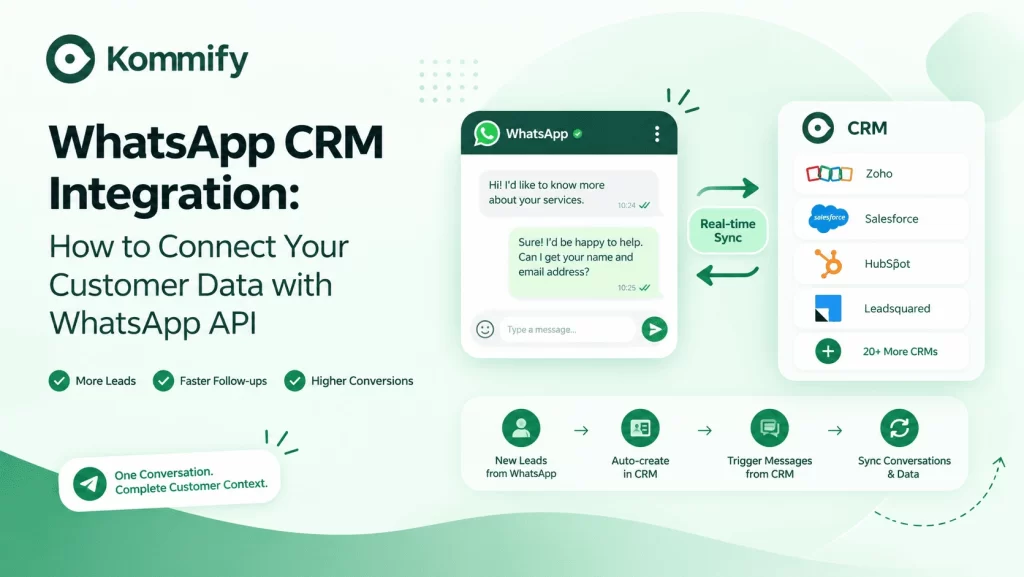
WhatsApp CRM integration connects your WhatsApp Business API with a CRM (Zoho, Salesforce, HubSpot, Leadsquared) so that every WhatsApp conversation appears as a contact activity, new leads from WhatsApp are auto-created in the CRM, and CRM events (deal stage change, form submission) can trigger WhatsApp messages. Most BSPs like Kommify offer native CRM integrations with no coding required.
WhatsApp CRM Integration: Connecting Customer Data to Your Conversations
A WhatsApp API setup without CRM integration is like having a great salesperson who never updates the records. Conversations happen, leads come in, customers ask questions — but none of it connects to the system where your business actually tracks relationships and moves leads forward.
This guide breaks down what WhatsApp CRM integration actually means in practice, which CRM systems work best, and the specific data flows that turn WhatsApp conversations into actionable customer information.
What WhatsApp-CRM Integration Actually Does
The real power of WhatsApp CRM integration comes from its two-way data flow. Your CRM can trigger WhatsApp messages when important events happen, while WhatsApp conversations can automatically update your CRM — keeping both systems connected and in sync.
CRM → WhatsApp
A lead changes stage, a payment is due, or a contract is about to expire? Your CRM can trigger the right WhatsApp message automatically.
WhatsApp → CRM
New WhatsApp messages can create or update contacts, log conversations, and sync important labels and notes back to your CRM.
Sales gets the full customer history. Marketing can target CRM segments with relevant WhatsApp campaigns. Support can see deals and purchase history while handling customer queries. One conversation, complete context.
Native Integrations: What Kommify Supports
Key Data Flows in the Zoho Integration
See how WhatsApp conversations automatically move leads through your sales journey.
New WhatsApp Conversation
A customer starts a conversation on WhatsApp.
Auto-Create Lead
The conversation automatically creates a new lead in Zoho.
Proposal Sent
Moving the lead to “Proposal Sent” triggers a WhatsApp template.
Deal Won 🎉
A WhatsApp congratulation and onboarding message is sent automatically.
7-Day Re-engagement
If there is no activity for 7 days, a re-engagement WhatsApp message is triggered.
What Data Flows Between Systems
What Gets Synced?
Keep your CRM and WhatsApp data connected and up to date.
The Lead Qualification Flow That Works
From Website Visitor → Warm Sales Lead
Let automation handle the first conversation, qualification and CRM updates — so your sales team can focus on leads that are ready to buy.
Lead Captured
A prospect fills out your website form and enters your sales funnel.
CRM Creates Lead
The lead is automatically created and stored in your CRM.
WhatsApp Engages
Kommify instantly starts the conversation on WhatsApp.
Chatbot Qualifies
The chatbot asks the questions that matter.
Sales Gets the Lead
Responses update the CRM automatically, ready for sales follow-up.
Indian businesses that integrate WhatsApp with CRM report 45% faster lead response times and 28% higher lead-to-customer conversion rates compared to phone/email-only follow-up. The speed advantage is significant — leads contacted within 5 minutes are 9× more likely to convert than those contacted after 30 minutes.
Frequently Asked Questions
Quick answers to common questions about WhatsApp CRM integration.
Yes. Kommify's Zoho CRM integration is a native, no-code connector. You authenticate both accounts, map fields such as name, phone and deal stage, and configure trigger rules through a simple UI — no code or API calls to write yourself. Setup typically takes 20–30 minutes.
Yes, via webhook integration. Your CRM sends an HTTP POST to Kommify when a defined event occurs, and Kommify sends the appropriate WhatsApp template. This requires some developer work on your CRM's side to configure the webhook, but the Kommify side is documented and straightforward.
Conversation history in Kommify is independent of the CRM, so it remains accessible in your WhatsApp inbox. The CRM link is broken, but the messages aren't lost. Most businesses keep a 12-month chat history in Kommify regardless of CRM status.
Ready to Connect WhatsApp to Your CRM?
Bring your WhatsApp conversations, leads and customer data together. Kommify integrates with Zoho, Salesforce, HubSpot and 20+ CRMs — with setup taking less than an hour.
See CRM Integrations →Simplify conversations. Automate follow-ups. Close more leads.